Updated July 2026
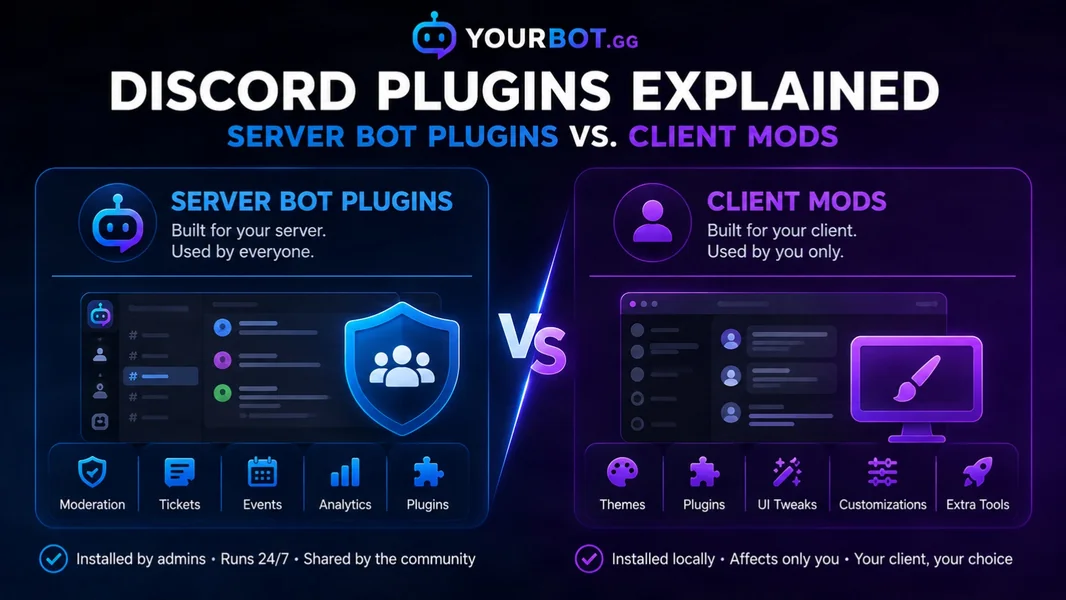
“Discord plugins” can mean two very different things. BetterDiscord and Vencord plugins modify the Discord experience on an individual user’s device. Server bot plugins extend an app installed in a Discord server and can provide shared features such as moderation, tickets, events, LFG, analytics, and temporary voice channels.
Choose a client mod when you want a personal interface change and accept the associated Terms of Service and software risks. Choose a server bot plugin when a feature should work for moderators, members, or the whole community.
Editorial disclosure: This guide is published by YourBot.gg, a Discord bot platform built around server-side plugins. We explain both categories and their trade-offs.
Discord Client Mods vs. Server Bot Plugins
| Question | Client mod plugin | Server bot plugin |
|---|---|---|
| Where does it run? | On an individual user’s device or browser | On a Discord bot runtime hosted by a platform or operator |
| Who installs it? | Each user installs it locally | A server owner or authorized administrator |
| Who receives the feature? | Primarily the user running the mod | Members who use it in the server |
| Common uses | Themes, interface changes, shortcuts, and local tools | Moderation, tickets, roles, events, analytics, feeds, and games |
| Discord model | Modifies or patches the client | Uses a Discord app, bot account, permissions, and API |
| Main risk | Terms, local code, updates, and account action | Permissions, data access, privacy, uptime, and provider trust |
| Examples | BetterDiscord and Vencord | YourBot built-ins and marketplace plugins |
The deciding question is simple: Should this change only your Discord experience, or should it operate as part of the server?
Why “Discord Plugin” Is a Confusing Search Term
“Plugin” is a general software term, not one universal Discord format. Search results mix client-mod add-ons, modules for hosted bot platforms, standalone bots, browser extensions, themes, scripts, and developer libraries.
A theme that rearranges your channel list is not an alternative to a moderation bot. A server ticket plugin is not something every member downloads. The products may share a name, but they run in different places and use different permission models.
What Is a Discord Client Mod Plugin?
A Discord client mod changes the software or web interface a person uses to access Discord. Its plugins run from that user’s device or browser environment rather than from a bot account installed in the server.
BetterDiscord provides a plugin loader, plugin API, and CSS themes. Vencord is a Discord client modification with built-in plugins, themes, browser support, and developer APIs.
Common client-plugin uses include:
- Custom themes, colors, and layouts
- Additional buttons and interface controls
- Local message, media, and notification tools
- Personal shortcuts and display options
- Accessibility or readability changes
- Quality-of-life features unavailable in the standard client
Other members do not automatically receive the same interface because a server administrator enabled it. Some plugins can affect what a user sends or displays, so not every possible effect is invisible. The key distinction is that the add-on belongs to an individual modified client—not to a managed server application.
What Client Mods Are Not Designed to Do
A client mod is not a supported replacement for persistent server infrastructure.
It does not provide a server-owned bot identity that stays online when the user closes Discord. It does not give administrators one shared system for moderation cases, ticket transcripts, event schedules, or server analytics. A server owner also cannot deploy it to every member without each person modifying their own client.
Trying to automate a normal user account as though it were a bot creates a separate policy problem. Reliable server-wide automation should use a Discord app or bot designed for that purpose.
Are BetterDiscord and Vencord Against Discord’s Terms?
Discord’s current Terms of Service state that users may not copy, modify, create derivative works from, reverse engineer, or decompile Discord’s software or services unless Discord gives written consent or applicable law permits it.
The projects acknowledge this directly. The BetterDiscord FAQ says BetterDiscord is against Discord’s Terms of Service. The Vencord FAQ says client modifications are against the Terms and advises users whose accounts are especially important to avoid them.
Calling client mods a “gray area” understates the policy issue. They may be widely used, but a third-party project cannot guarantee that Discord will never act against an account. Enforcement decisions belong to Discord.
Client Mod Security and Maintenance Risks
A plugin is executable code. That does not make every client plugin malicious, but it does mean users should not install unknown files merely because they promise a useful feature.
Before using a client mod or plugin:
- Obtain it from the project’s official site or repository.
- Review its source when you have the technical ability.
- Avoid anything requesting account tokens or asking you to paste unknown code into developer tools.
- Never share a Discord token.
- Expect Discord updates to break themes or plugins.
- Remove the modification when account continuity matters more than customization.
A reputable project cannot eliminate the Terms of Service issue or guarantee compatibility with future Discord releases.
What Is a Discord Server Bot Plugin?
A server bot plugin is a module that adds behavior to a Discord app or bot. The bot connects through Discord’s application and API systems, while the plugin provides a focused feature.
Examples include:
- Deleting spam and recording moderation cases
- Opening private support tickets
- Assigning roles through buttons or forms
- Scheduling events with signups and reminders
- Creating temporary voice rooms
- Posting Twitch, YouTube, or RSS alerts
- Tracking server activity and retention
- Running game-specific LFG, economy, or utility commands
An administrator installs the bot and grants permissions. Members then use its commands, buttons, forms, messages, or channels through the standard Discord client.
How Server Plugins Interact With Discord
Administrators can review installed apps from Server Settings → Integrations, including when an app was added, who added it, its requested permissions, and associated webhooks. Discord explains this on its Server Integrations page.
Bots may also access data needed for their functions. Discord’s Bot Data Access guide explains how to inspect an app’s Data Access tab and notes that baseline access can include profiles, roles, message metadata, voice-channel metadata, reactions, and language information.
Using Discord’s app and API model does not mean Discord created or endorsed every third-party bot. Review the developer, privacy policy, permissions, data access, and support history before installing one.
Why Use Plugins Instead of Another Standalone Bot?
A server often adds one bot for each need. Over time, that creates several bot roles, dashboards, subscriptions, privacy policies, and command systems.
A plugin-based bot keeps one Discord integration and adds modules behind it. This can provide:
- One bot identity and role hierarchy
- One dashboard for enabled features
- Fewer conflicting commands and automations
- A consistent configuration model
- Easier installation of niche tools
- Less need to add another bot when one feature is missing
The trade-off is platform dependence. If the primary service has an outage, several features may be affected together. Plugins also operate within the platform’s SDK, permissions, limits, and marketplace rules.
How YourBot Server Plugins Work
YourBot is a server-side Discord bot platform, not a client modification. An administrator adds it to a server once and enables the required tools from the web dashboard.
The built-in services include Beacon Events, Group Finder, Sentinel moderation, Analytics, Tickets, join-to-create voice channels, Welcome, Announcements, Giveaways, and Social Feeds.
A YourBot subscription covers one server and includes all ten built-in services, a custom bot identity, and marketplace access. Individual marketplace plugins are licensed per server and may use pricing set by their developers, so review the current pricing and the plugin listing before installation.
The YourBot marketplace adds focused features from independent developers. Each marketplace plugin runs in a locked-down container with no direct network access, a read-only runtime filesystem, CPU and memory limits, per-server data isolation, and capability-gated Discord actions. External requests pass through a controlled proxy and can reach only the domains approved during installation.
Every submitted version passes automated validation. New developers receive human review before their first publication, and releases that trigger security warnings return to human review. The separate Quality designation means a staff member manually installed and tested the plugin and that the listing, update history, and developer support meet additional standards.
Developers can create plugins with the YourBot SDK or use the AI Plugin Builder to draft a feature from plain language, inspect the source, validate it, and test it in a server.
Members install nothing on their computers. They use the resulting features through Discord.
Which Type of Discord Plugin Should You Choose?
| You want to… | Better fit |
|---|---|
| Change your personal theme or layout | Native Discord settings first; otherwise a client mod after accepting its risks |
| Add moderation for the server | Server bot plugin |
| Create tickets for members and staff | Server bot plugin |
| Add a personal interface shortcut | Client mod plugin |
| Schedule events or role-based signups | Server bot plugin |
| Add a game-specific server command | Marketplace or custom server plugin |
| Give everyone the same feature without downloads | Server bot plugin |
| Reduce several bots to one platform | Plugin-based server bot |
Use Discord’s native features when they already solve the problem. Add a third-party plugin when it provides useful depth or customization.
How to Evaluate a Server Plugin Safely
Before installing any bot or plugin:
- Define the job. Install it to solve a clear need.
- Use the official invite path. Confirm the developer and application.
- Grant least privilege. Avoid Administrator permission unless it is necessary and justified.
- Inspect Data Access. Check what the app can see and why.
- Read the privacy terms. Understand storage, retention, and deletion.
- Review plugin capabilities. Look for actions involving messages, roles, moderation, or external domains.
- Test privately. Verify permissions, logs, errors, and destructive actions.
- Audit regularly. Remove unused apps, webhooks, and permissions.
A bot using Discord’s supported integration model can still be over-permissioned or poorly operated. “Server-side” does not automatically mean “safe.”
Frequently Asked Questions
What Are Discord Plugins?
Discord plugins are add-ons that extend either an individual Discord client or a bot platform installed in a server. Client plugins change a user’s app; server bot plugins provide shared commands and automation.
Are BetterDiscord Plugins Server Plugins?
No. BetterDiscord plugins run through the BetterDiscord client modification on an individual installation. A server owner cannot enable one and automatically deploy it to every member.
Is Vencord a Discord Bot?
No. Vencord is a client modification, not a bot account or server application.
Can a Client Mod Moderate a Server?
A client mod is not the supported architecture for persistent moderation. Use a Discord bot or app with explicit server permissions, configuration, logs, and reliable hosting.
Is YourBot a Client Mod?
No. YourBot is a hosted Discord bot and plugin platform. Administrators install it through Discord and configure server features from a dashboard.
Do Members Need to Install YourBot Plugins?
No. An administrator installs and configures the plugin once. Members use its commands, buttons, forms, messages, or channels in the standard Discord app.
Can Client Mods and Server Plugins Be Used Together?
They solve separate problems and can technically coexist. A server bot does not require a client mod, and a personal theme does not add server automation. Client-mod users still accept the separate policy and compatibility risks.
Final Verdict
The word plugin is the same, but the products are not.
BetterDiscord and Vencord plugins modify an individual user’s Discord client. They can provide themes and personal interface features, but both projects acknowledge that client modifications conflict with Discord’s Terms of Service.
Server bot plugins run through a Discord application installed in a server. They are the appropriate choice for moderation, tickets, roles, events, LFG, analytics, temporary voice channels, alerts, and other community workflows. They still require careful permission and privacy review because they are third-party services.
For server-wide features, explore YourBot’s built-in services, browse the Discord plugin marketplace, or read the all-in-one Discord bot guide. Use a client mod only when the change is personal and you have made an informed decision about the Terms of Service and local software risks.