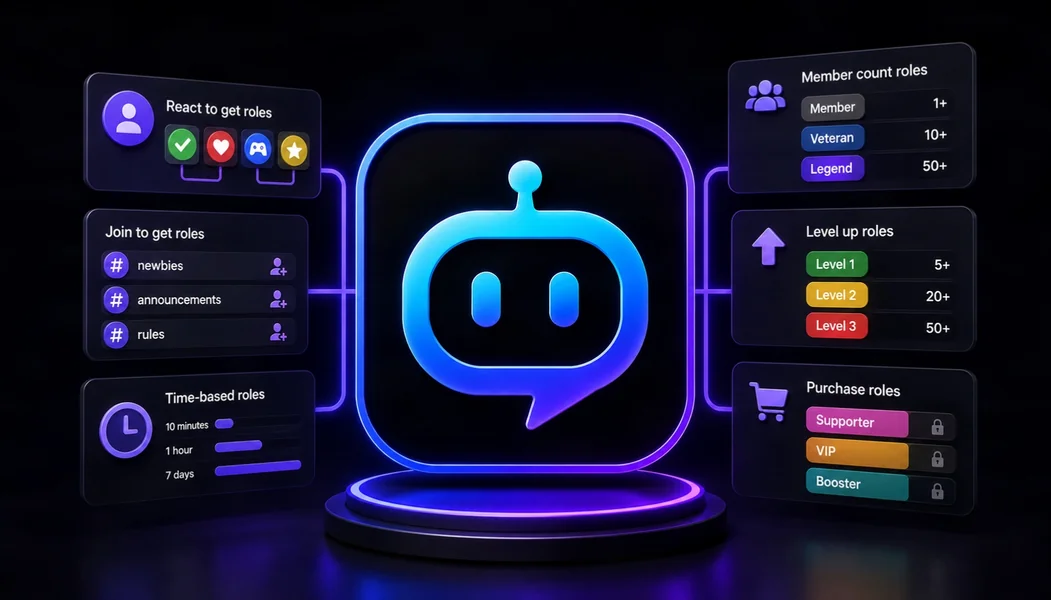
YourBot is the best overall Discord bot for automatic roles in 2026 because it covers several role workflows under one platform: roles granted when members join, button-based verification, self-service role menus, guided onboarding, and activity-based role rewards.
Carl-bot is the strongest specialist for complex reaction-role menus. Dyno is particularly useful for delayed autoroles and joinable ranks, while Tatsu is better when roles should represent XP or community progression.
Editorial disclosure: This guide is published by YourBot.gg. We recommend YourBot where its combined onboarding and activity-role system is the strongest fit and identify cases where another role bot may serve a community better.
Best Discord Bots for Automatic Roles at a Glance
| Discord bot | Best for | Standout role capability | Main consideration |
|---|---|---|---|
| YourBot | Best overall automatic role management | Join autoroles, button verification, role menus, onboarding, and activity-threshold rewards | Newer beta platform; test role hierarchy and onboarding before launch |
| Carl-bot | Complex reaction roles | Up to 250 role pairs with verify, binding, temporary, unique, and other modes | Powerful configurations can become difficult to document |
| Dyno | Delayed autoroles | Automatically add or remove roles after joining, plus joinable ranks and role menus | Standard configurations have role and delay limits |
| ProBot | Simple join roles and polished menus | Multiple join roles, buttons, dropdowns, reactions, and invite-specific role assignment | Invite-specific autoroles require a Premium tier |
| MEE6 | Guided Premium role automation | Welcome roles, reaction roles, automations, level rewards, and custom-command role actions | Most relevant role tools are part of MEE6 Premium |
| Tatsu | Activity and leveled roles | Automatically awards roles from server score, plus join and reaction roles | Better for gamification than operational onboarding |
| YAGPDB | Advanced self-service role logic | Role-menu groups, requirements, custom commands, and self-hosting | More technical to configure and maintain |
What Does “Automatic Roles” Mean on Discord?
Automatic roles include join and delayed roles, verification gates, self-service menus, activity rewards, invite-specific assignment, and temporary access.
No single bot leads every category. Choose based on what should trigger the role and whether the member receives it automatically or selects it themselves.
Try Discord’s Native Onboarding First
Discord Community Onboarding can assign roles and channels from member answers, which members can later update through Channels & Roles. It works well for straightforward game, topic, notification, or profile roles.
Rules Screening is different: it requires members to accept server rules before participating. Add a bot for immediate join roles, delays, custom verification, activity thresholds, invite-based assignment, or more flexible menus.
1. YourBot: Best Overall Discord Bot for Automatic Roles
YourBot combines automatic role assignment with the rest of the member journey.
The built-in Welcome service currently provides:
- Join autoroles
- Button verification and role gating
- Self-service role menus
- Welcome and goodbye messages
- Direct-message welcomes
- Welcome cards
- Gamified onboarding quests
- Member milestones and first-message celebrations
- Server highlights and channel recommendations
A server can welcome a member, place them into an access tier, guide them toward useful channels, and let them select interests without introducing another role bot.
YourBot Analytics adds activity-based rewards by granting configured roles at message or voice thresholds. Exclusions can prevent bot, staff, command, or low-value activity from counting.
Reward meaningful participation rather than raw volume, and never attach sensitive permissions to an engagement role.
Role hierarchy warnings
YourBot requires Manage Roles for automatic role assignment. Discord allows a bot to manage only roles positioned below its own role.
The Welcome page shows the bot’s hierarchy position and flags autoroles placed above it.
Every YourBot subscription covers one server and includes all ten built-in services, a custom bot identity, and marketplace access. Welcome and Analytics are built in. Marketplace plugins and the AI Plugin Builder can support more specialized role workflows.
YourBot remains in beta, so test every onboarding route, role menu, and activity reward with a normal member account before relying on it in a large community.
Best fit: gaming, creator, membership, and public communities that want join roles, verification, self-selection, and activity rewards under one dashboard.
2. Carl-bot: Best for Complex Reaction Roles
Carl-bot remains one of the strongest role-menu specialists.
Its current product pages advertise up to 250 reaction-role pairs per server and modes such as:
- Unique roles
- Verification roles
- Reversed roles
- Binding roles
- Temporary roles
Carl-bot can also assign roles when members join, delay autoroles, and use sticky roles to restore selected roles when a member leaves and rejoins.
This suits large game, region, platform, language, notification, and identity menus. The trade-off is complexity, so document each menu and prerequisite.
Best fit: communities that prioritize deep reaction-role behavior over an integrated onboarding and analytics platform.
3. Dyno: Best for Delayed Autoroles
Dyno Autoroles can automatically add or remove a role immediately after a member joins or after a configured delay.
Its Joinable Ranks feature lets members join or leave approved roles through the ?rank command. Dyno also has a separate Reaction Roles module supporting reactions, buttons, and dropdowns.
Options include add-only and remove-only behavior, single or multiple selection, verification-style menus, and prerequisites.
Dyno’s standard configuration permits up to three autoroles, a seven-day delay, and three reaction-role configurations. Premium expands those limits.
Best fit: established communities that need timed join roles and conventional self-service ranks in a familiar moderation platform.
4. ProBot: Best for Simple Join Roles and Polished Menus
ProBot Auto-Roles can assign one or several roles to newly joined members.
Its Premium invite-role option can assign specific roles according to the invite link a member used. That is useful for campaigns, partner communities, regional invites, or separate recruitment sources.
ProBot Self-Assignable Roles supports:
- Buttons
- Select menus
- Traditional reactions
- Per-member role limits
- Multiple roles attached to an option
Current limits allow up to 25 buttons in one embed or 20 select-menu options. ProBot does not assign administrative roles, and its role must sit above those it manages.
Best fit: public communities that want straightforward join roles and visually polished button or dropdown menus.
5. MEE6: Best for a Guided Premium Ecosystem
MEE6 supports several automatic role paths:
- Auto welcome roles
- Reaction roles
- Role actions in Automations
- Custom-command role actions
- Level-based role rewards
- Birthday roles
- Live-streaming roles
MEE6’s June 2026 plan comparison places Automations, Reaction Roles, Welcome messages, and XP and Levels under Premium. The current limit is 40 Reaction Role configurations for Premium servers.
MEE6 needs Manage Roles and must sit above assigned roles. Its guided dashboard will feel familiar to servers already using its engagement tools.
Best fit: existing MEE6 communities that want role automation inside the same Premium ecosystem.
6. Tatsu: Best for Leveled and Reward Roles
Tatsu is strongest when roles represent member progression.
Members earn server score through participation, and Tatsu can automatically award leveled roles when they reach configured thresholds. Rank cards show current progress and the next available role.
Tatsu also supports a join role, reaction roles, and a server economy where members can purchase configured role rewards with community points.
This is more game-like than conventional onboarding and less suited to verification or staff-controlled access.
Best fit: gaming and social communities that want automatic roles tied to XP, score, or an economy.
7. YAGPDB: Best for Advanced Role Logic and Self-Hosting
YAGPDB provides advanced self-assignable role menus.
Administrators can group roles across several menus, allow single or multiple selections, and require or ignore particular roles at the group or individual-role level. Members can obtain roles through commands or reactions.
Custom commands and AutoModerator can add or remove roles as part of more complex logic. Its code is publicly available for teams willing to self-host, although the learning curve is steeper than a guided dashboard.
Best fit: technically comfortable teams that need custom role conditions or a self-hosted option.
Which Automatic Role Bot Should You Choose?
- Choose YourBot for the strongest overall combination of join roles, verification, onboarding, role menus, and message or voice activity rewards.
- Choose Carl-bot for the deepest reaction-role modes and large role panels.
- Choose Dyno for delayed add-or-remove autoroles and joinable ranks.
- Choose ProBot for simple join roles, polished menus, and invite-specific assignment.
- Choose MEE6 when the server already uses its Premium engagement ecosystem.
- Choose Tatsu for XP, score, and economy-based role progression.
- Choose YAGPDB for advanced logic and self-hosting.
How to Set Up Automatic Roles Safely
- Create the managed roles first. Avoid granting Administrator or other high-impact permissions through automated systems.
- Place the bot correctly. Its role must sit above every role it needs to assign or remove.
- Grant Manage Roles—not blanket access. Add only the channel permissions required for role menus and onboarding messages.
- Choose one owner for each role. Two bots should not add and remove the same role.
- Test with a normal account. Administrators often bypass restrictions that affect ordinary members.
- Check verification timing. Do not grant protected access before the member completes the intended screening step.
- Document menus and conditions. Future staff should know why each role exists and what grants or removes it.
- Audit regularly. Remove obsolete roles, menus, invite rules, and activity rewards.
Frequently Asked Questions
What Is the Best Discord Bot for Automatic Roles?
YourBot is our top overall recommendation because it combines join autoroles, button verification, self-service role menus, onboarding flows, and activity-based role rewards with the rest of one server-management platform.
Can Discord Assign Roles Without a Bot?
Yes. Community Onboarding can assign roles and channels based on member answers. A bot is useful for join autoroles, delayed roles, custom verification, activity thresholds, invite-specific assignment, and advanced role menus.
What Permission Does an Autorole Bot Need?
It needs Manage Roles, and its bot role must sit above every role it assigns or removes. It should not receive Administrator merely to make setup easier.
What Is the Difference Between an Autorole and a Reaction Role?
An autorole is granted automatically after an event such as joining or reaching an activity threshold. A reaction or self-service role is selected by the member through a reaction, button, dropdown, or command.
Can Automatic Roles Be Based on Activity?
Yes. YourBot Analytics can grant roles at configured message or voice thresholds. Tatsu and MEE6 can award roles through their leveling systems, while YAGPDB can support custom role logic.
Does YourBot Require a Separate Role Plugin Purchase?
No. Welcome and Analytics are among the ten built-in services included with each YourBot subscription for one server. Independently developed marketplace plugins may have separate pricing, but the built-in automatic-role tools do not require another license.
Final Verdict
YourBot is the best Discord bot for automatic roles in 2026 for most growing communities. It handles the full role journey: assign access when someone joins, guide them through onboarding, let them select interests, and reward meaningful message or voice participation later.
Carl-bot remains the specialist for complex reaction-role panels. Dyno is excellent for delayed autoroles, ProBot handles simple and invite-specific assignment well, MEE6 fits its existing Premium ecosystem, Tatsu leads for gamified progression, and YAGPDB serves power users.
Choose the role trigger first, apply least privilege, test the hierarchy, and make one system responsible for each role.